Landscaping Software
Landscaping & Lawn Care Software
Each crew's day on their phone with the route mapped, yards measured from satellite before you drive out, and spring cleanup offers sent to the right customers. One app for a small lawn and landscape business, $33 a month flat for up to 10 users.


What a lawn and landscape business needs
Built inEvery visit on the calendar
Set each property's frequency once and its visits show on the calendar every week. Make them the day's jobs and map the route in a tap.
Measure the yard from satellite
Trace the turf on aerial imagery to get square footage, then price mulch, sod or seed without a site visit.
Offer cleanups to the right people
Build a list of customers whose last aeration or spring cleanup was more than a year ago and send them an offer.
One stop becomes three
When you book a job, the app finds nearby customers so the crew can add same-trip work.
Storm cleanup alerts
Storm Radar flags severe storm and high wind warnings over your customers, with a ready-to-send message for cleanup work.
Invoice and card payment
Branded invoices, card payments through Stripe, and automatic reminders on past-due accounts.
Routing software for landscapers
How crews get their dayEvery crew opens the app to their own stops for the day, puts them in driving order, and heads out.
- Assign the work. Put each job on a crew. The Calendar shows a card for every crew with its stops, hours of work, drive time and the day's rain chance.
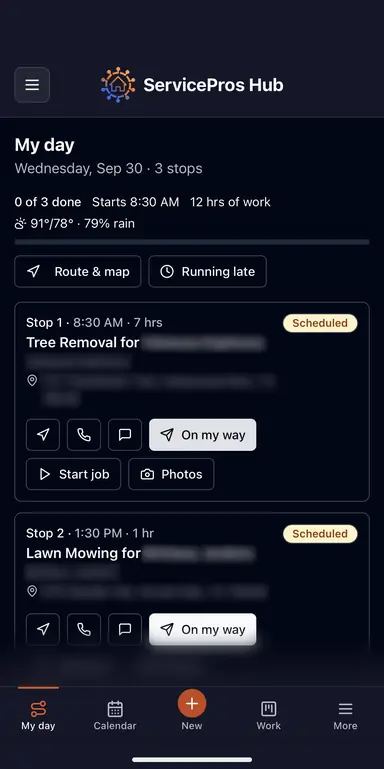
- Crews open My day. On their phone, each crew sees its stops with Navigate, Call, Text, On my way, Start job and Finish job on every one.
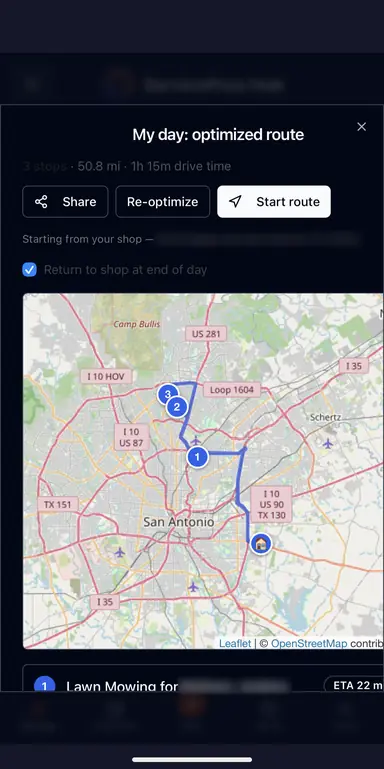
- Map the route. Route & map puts up to 12 stops in the shortest driving order from your shop, with total miles, drive time and an ETA for each stop. Start route opens Google Maps with every stop loaded.
- Text the crew lead. Text the day sends the stops with a map of numbered pins, and a night-before text can go out on its own (7 PM by default).
- Keep customers posted. On my way texts the customer an arrival time, and Running late texts everyone still waiting with the new time.
Nearby work orders shows approved jobs with no date yet within 5 miles of a crew's stops, so a free hour can become another job on the same trip. Recurring mowing visits join the route once they're made into the day's jobs.
Landscaping estimate software
Measure, price, send- Measure from satellite. Trace the turf and beds in the app's area calculator and send the square footage straight into a new estimate as a line item.
- Price it from your list. Pick services from your own price list and the prices fill in, or let AI draft the scope and line items from a short description. The mulch calculator gives you the cubic yards.
- Add photos and the schedule. Attach photos or video of the property, and set mowing to weekly, every two weeks, monthly or by season right on the estimate.
- Send and get the yes. Email it as a PDF and by text. The customer accepts from the link, and the estimate becomes a job ready to schedule.
- Follow up on time. Estimates still open after 7 days show up in your daily brief under Proposals to follow up.
How it runs for landscaping businesses
A typical weekLawn care is a route business with seasonal upsells: weekly mowing pays the bills, and cleanups, aeration and installs grow them.
A typical week: 60 mowing stops from recurring schedules, two landscape estimates, and a mulch install. Each crew opens My day on their phone, taps Route & map for the driving order, and starts the route in Google Maps.
For the estimates, measure the beds and turf from satellite with the free area tool, check material quantities with the mulch calculator, and send options from your phone. Our lawn pricing guide walks through how to price a mowing job from your cost per hour.
In spring and fall, pull a list of customers who haven't had a cleanup or aeration in a year and send them an offer in a couple of taps.
More than a CRM — your growth engine
Why pros switchAt-Risk Radar
Customers who've gone quiet are flagged automatically, with one-tap mass win-back — the repeat work most shops leave on the table.
Crew in your neighborhood
Book a job and the app finds nearby customers to offer a same-trip visit. Turn one stop into three — the premium service others charge extra for.
Automatic Google reviews
The moment a job's marked done, a review request goes out by email and text — the reputation service pros pay hundreds for, built in.
Before/after galleries
Turn job photos into shareable before/after galleries in a few clicks — the content SEO agencies bill a fortune to produce.
Built to sound like you
Set your brand voice once, then polish proposals, texts, invoices, newsletters and Facebook posts with one tap — every message sounds like you.
See your money like a CFO
A daily brief flags stale invoices and aging proposals, and A/R Aging and Sales Tax reports are ready to send right from the truck.
Photos, video & notes on file
Every photo, video and note on the customer's record ("big dog out back — knock first"). The photo tools other apps charge per user for, included.
Scan-a-card + built-in weather
Snap a scribbled note to create a customer instantly, and plan around the built-in weather forecast — no extra apps to buy.
Start the day with a plan
Open the app to a daily brief that surfaces the proposals waiting on a follow-up, the invoices that are past due, and a smart order for the day — so you always know what to chase first.
Why small landscaping businesses pick us
Landscaping software is usually priced per user, which hurts when you add seasonal crews. Up to 10 users are included here for one flat price.
ServicePros Hub is the opposite: one flat $33/month for up to 10 users, with proposals, scheduling, invoicing, card payments, review requests, and marketing all in the base price. Add a crew member or a seasonal helper without watching the bill climb.
It's the loop the job actually runs — quote → schedule → do the job → invoice → get paid — with free tools (a pay-range hiring guide, a profit & break-even calculator, and trade calculators) that help you price, staff, and win the work.
No contract and a 30-day free trial with no credit card, so you can run real jobs through it before you commit.
Free tools for landscaping
Free, no sign-upProperty Area Measure
Measure a yard or lot from satellite before you quote.
Open →Mulch & Material Calculator
Cubic yards, tons and bags of mulch, soil, gravel or sod.
Open →Lawn Care Prices
2026 mowing prices plus a step-by-step method for what to charge.
Open →Profit & Break-Even
Turn overhead, wages, and reserve into the revenue you need to hit your margin.
Open →FAQ
Landscaping softwareWhat is the best landscaping software for a small business?
The best fit runs recurring mowing routes, helps you measure and quote, and handles invoicing and payments without per-user pricing. ServicePros Hub does that for a flat $33/month for up to 10 users.
Can I schedule recurring lawn mowing visits?
Yes. Set each property's frequency once (weekly, every two weeks, monthly or by season) and its visits show on the calendar automatically.
Is there route planning for lawn crews?
Yes. Each crew sees its stops on the My day screen. Route & map puts up to 12 stops in the shortest driving order from your shop, with drive time and an ETA for each stop, and Start route opens the whole route in Google Maps.
How do I make a landscaping estimate in the app?
Measure the turf and beds from satellite, send the square footage into a new estimate, and price it from your own price list. Email or text it, and the customer accepts from the link.
Can I measure a yard without visiting it?
Yes. The free property area tool measures turf and beds from satellite imagery so you can quote before you drive out.
How do I price a lawn mowing job?
Our lawn care pricing guide has 2026 prices by lot size and a step-by-step method based on your cost per hour, time on the lot and target margin.
How much does lawn care software cost?
ServicePros Hub is $33/month flat for up to 10 users with every feature included and a 30-day free trial.
Run your mowing route and grow the rest
Crew routes, satellite measuring, estimates, seasonal offers and card payments for small lawn and landscape businesses. One flat price.
Start your 30-day free trial →